Quick Response (QR) codes are everywhere: on consumer packaging, industrial equipment, product manuals, and Digital Product Passports (DPP).
To the human eye, a QR code appears as a chaotic mosaic of black and white squares. To a smartphone camera or an optical verifier, it is a rigorous, two-dimensional coordinate system governed by strict international standards (ISO/IEC 18004 and CEN/TS 18220).
Whether you are designing labels for EU regulatory compliance, implementing GS1 Digital Link barcodes, or optimizing scanning speed in manufacturing, understanding how a QR code is built is essential.
Contents
The Coordinate Grid and Modules
A QR code is not a bitmap image or an abstract graphic. It is an exact mathematical coordinate grid composed of individual squares called modules.
The smallest indivisible building block of a QR code. A single square module represents one binary bit: a black square represents a binary 1, and a white square represents a binary 0.
The physical width of a single module is known in barcode standards as the X-dimension. Every measurement in a QR code, from position markers to whitespace, is expressed as a multiple of this width.
The Anatomy of a QR Code
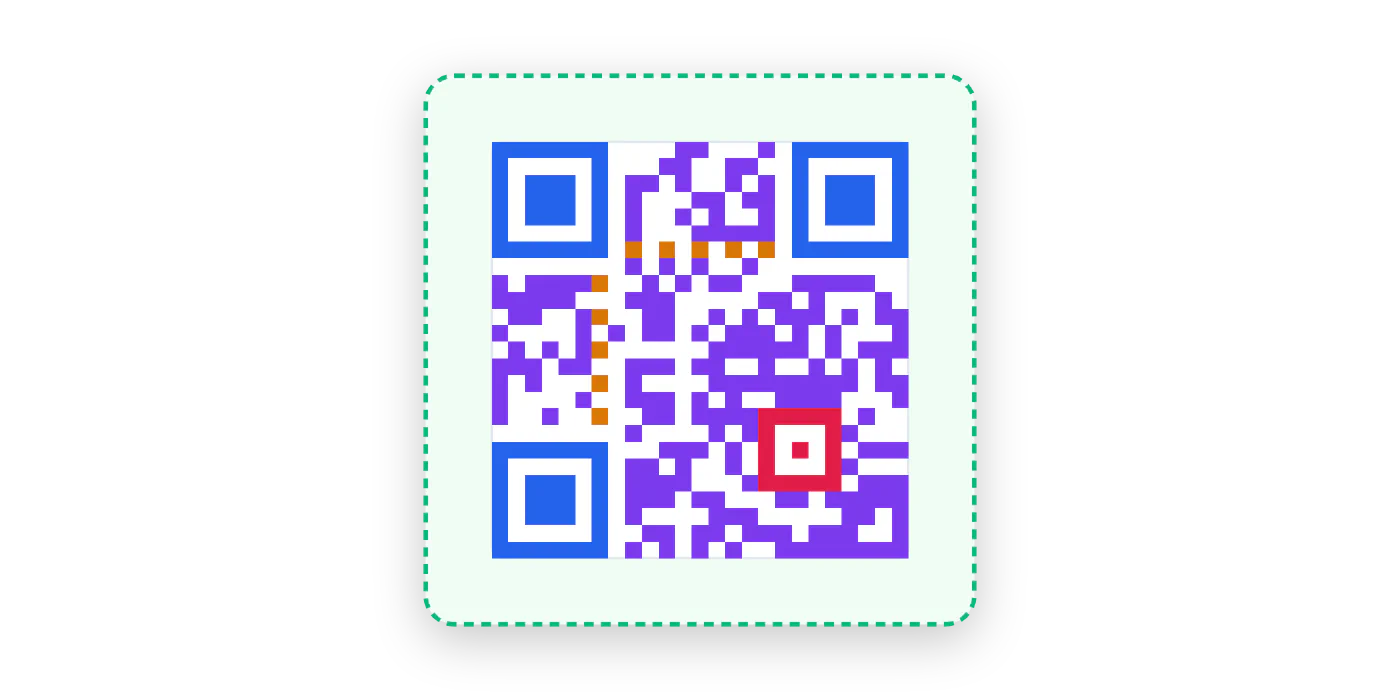
Across the coordinate grid, individual modules are never placed at random. International standards divide the matrix into five functional zones that allow cameras to find, orient, measure, and decode the payload:
7×7 nested corner markers. The unique 1:1:3:1:1 module ratio rarely occurs in print, enabling cameras to lock onto 360-degree orientation and tilt in milliseconds.
Alternating 1-module lines along Row 6 and Column 6. Act as a built-in coordinate ruler, locking camera tracking across the grid without optical drift.
5×5 concentric squares (Version 2+). Provide localized grid anchors to correct for lens tilt and curved packaging like bottles or flexible pouches.
Stores the actual message data and mathematical error correction blocks, interlaced so localized surface damage does not erase the entire message.
Mandatory 4-module clear border (4X). Prevents background graphics, label cuts, or packaging edges from interfering with finder edge detection.
The Payload: What QR Codes Actually Store
A common misconception is that a QR code somehow hosts or stores an entire web page.
It does not. A QR code is simply an encoded text string.
When an optical sensor scans the code, it reads that plain text string. If the string begins with a URI scheme like https://, modern smartphone operating systems recognize it as a web link and prompt the user to open it in a browser. If the string contains plain text, serial numbers, or contact cards, the device displays that information directly.
The camera reads the QR code.
The phone deciphers the code into a web link.
The browser requests the website from the server.
The type of characters you encode directly dictates how tightly data can be packed into the matrix:
- Numeric mode (Digits only): The most compact format. By packing three digits into a single 10-bit block, pure numeric data (such as GTINs, batch numbers, or serial digits) requires the fewest modules, keeping the grid coarse and easy to print.
- Alphanumeric mode (Digits, uppercase letters, select symbols): Compresses data by pairing characters together (storing uppercase letters
A-Z, numbers0-9, and basic punctuation like$ % * + - . / :). It can encode all-caps web links (such asHTTPS://EXAMPLE.COM), but cannot store lowercase letters or web parameters like?,=, and&. - Byte mode (Standard web links and full text): Uses a full 8-bit byte for every single character. Modern web addresses, GS1 Digital Links, and Digital Product Passports almost always require Byte mode because they contain lowercase letters, structured web paths, query parameters, or mixed-case serial numbers.
The packaging takeaway: While an all-caps domain can technically squeeze into Alphanumeric mode to save space, real-world web links almost always require Byte mode. Because Byte mode stores every character as a full byte without digit compression, every additional character in a URL directly adds physical modules to your grid. Keeping domain names and URL structures short is the single most effective way to keep your QR code printable at small sizes.
QR Code Versions and Packaging Density
A QR code cannot simply stretch its modules to hold more data. As your payload length increases, the QR generator must select a higher version number to accommodate the extra characters.
International standards define 40 standardized versions. The progression begins at Version 1 (21 × 21 modules) and adds exactly 4 modules per side (4 rows and 4 columns) with every version step, scaling all the way to Version 40 (177 × 177 modules):

441 total squares. Encoded in Alphanumeric mode. Fits numbers, uppercase letters, and select punctuation like colons and slashes, but cannot store lowercase characters.

625 total squares (+41%). Lowercase letters force 8-bit Byte mode. Even for the exact same domain name, switching to lowercase increases bit requirements and bumps the grid to Version 2.

1,089 total squares (+147%). Accommodates up to 62 URL characters at standard Level M. The baseline standard for Digital Product Passports using serialized GS1 Digital Link identifiers.
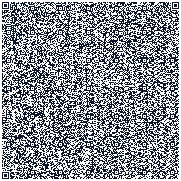
31,329 total squares (+7,004%). Holds up to 2,331 text characters (or 7,089 digits, nearly 3 KB of data) at Level M. The maximum standard limit, packing an entire document or multi-paragraph text directly into the physical matrix.
The Packaging Reality: Fixed Footprints vs Module Shrinkage
In digital software, a higher-version QR code simply expands outward to take up more pixels. On physical packaging, hangtags, and care labels, the space reserved for the barcode is fixed by the product size and label layout.
As the European DPP data carrier standard (EN 18220) highlights, encoding more data into a constrained overall footprint forces a smaller X-dimension (module width). Because the outer boundary cannot expand, stepping from Version 2 to Version 4 inside the same label square shrinks every individual module, noticeably reducing the printed ink area of each dot:
Physical labels reserve a fixed square for the barcode, blocking outward expansion.
To fit higher versions into that same square, each individual 1-bit module shrinks inward, significantly reducing printed dot size from Version 2 to Version 4.
The Impact on Print Tolerance and Scanning
This reduction in module size directly impacts real-world scanning reliability:
- Higher Printer Resolution (DPI) Needed: Thermal transfer and flexographic printers require higher resolution to prevent adjacent black modules from bleeding into white spaces.
- Sharper Camera Focus & Closer Range Required: Smartphone lenses must be held closer and focused more sharply to resolve micro-dots without optical blurring.
- Lower Tolerance for Wear & Glare: Scratches, dirt, glossy laminate reflections, and dim warehouse lighting degrade legibility much faster on dense matrices than on coarse grids.
Error Correction Levels for Damage Resistance
To keep barcodes readable when packaging gets handled, scratched, or soiled, QR codes incorporate Reed-Solomon error correction. Rather than wastefully repeating the same characters, the encoder generates calculated mathematical backup data across the grid. If part of the printed code is torn, scratched, or obscured by dirt, the scanner uses these backup formulas to solve for the missing pieces like an equation with a missing variable.
The ISO standard defines four recovery tiers tailored to different environments:
- Level L (~7%): Low-wear digital displays, indoor signage, or clean paper documents where damage risk is negligible.
- Level M (~15%): The universal industry standard for consumer packaging, retail hangtags, and Digital Product Passports.
- Level Q (~25%): Built for logistics cartons, shipping labels, and pallet crates exposed to frequent friction.
- Level H (~30%): Designed for harsh industrial machinery, chemical exposure, automotive parts, and outdoor weathering.
Higher recovery tiers withstand more severe damage, but require more backup data, which tightens the module grid inside a fixed label space.
The matrix below demonstrates these recovery thresholds in practice. You can scan each live code directly with your smartphone camera to test how lower tiers fail sequentially as surface wear increases:
|
Surface Damage
Physical Wear
|
Level L
~7% Limit
|
Level M
STANDARD
~15% Limit
|
Level Q
~25% Limit
|
Level H
~30% Limit
|
|---|---|---|---|---|
|
Pristine Code
0% surface wear
Factory print, intact surface
|
|
|
|
|
|
Surface Scratch
~7% surface wear
Handling & scrape mark
|
|
|
|
|
|
Shipping Abrasion
~15% surface wear
Pallet & box friction
|
|
|
|
|
|
Severe Tear
~25% surface wear
Missing label chunk
|
|
|
|
|
Next Step: Branding a QR Code Without Breaking It
Error correction is the safety margin that keeps a code scannable after scratches, dirt and wash cycles. A centre logo, QR art or an AI-generated image spends that margin before the label is even printed. Part two shows what each technique costs and how to brand a product QR code that still scans reliably.
 Part two
Logos and AI Art in QR Codes: Why They Risk Scans and What to Do Instead
Read article
Part two
Logos and AI Art in QR Codes: Why They Risk Scans and What to Do Instead
Read article